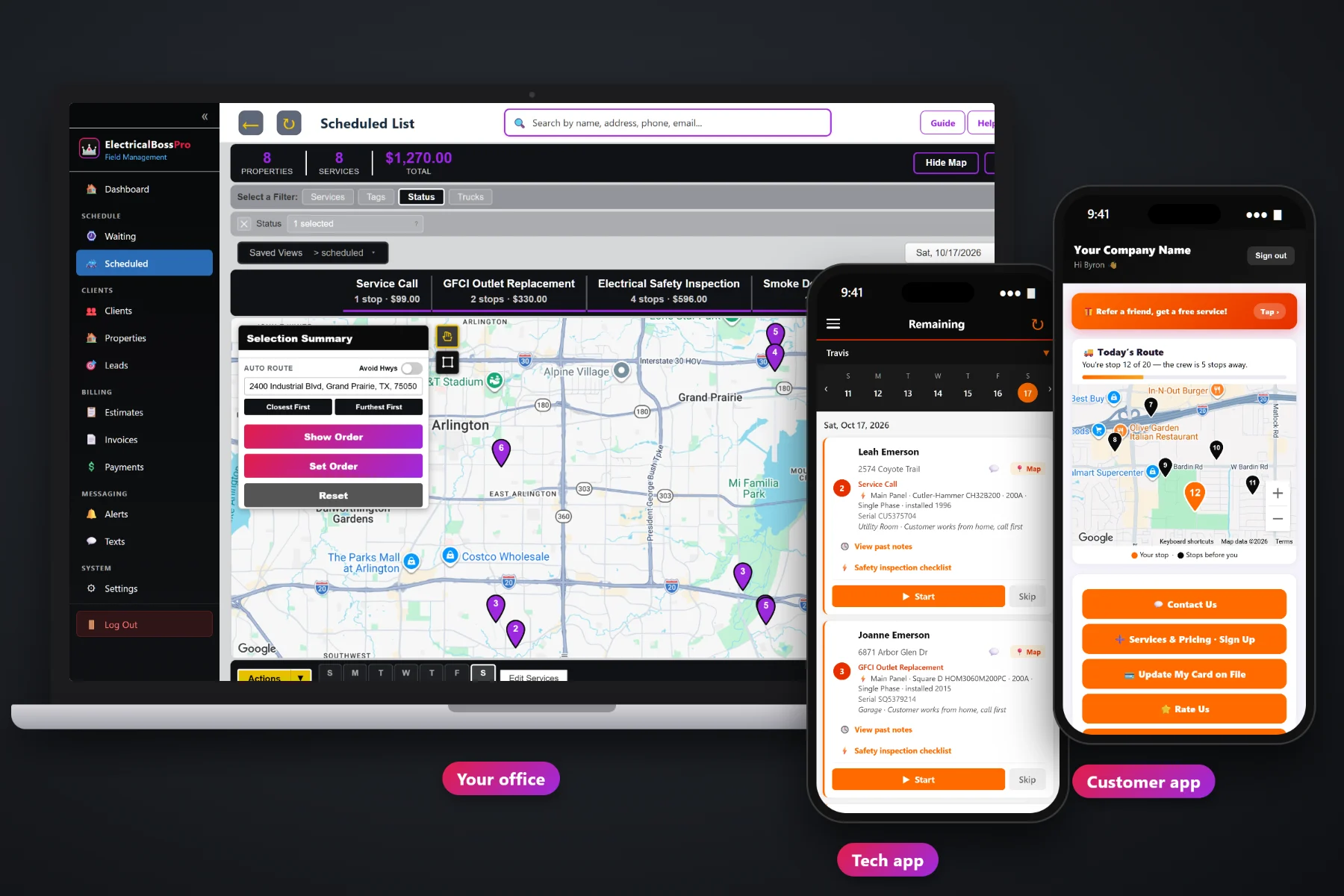
A property manager with forty units, a gym with six locations and a restaurant group with a kitchen at every address all want the same three things: an electrician who shows up when the building allows it, a short report on what was done, and one bill they can approve without a phone call. ElectricalBossPro keeps every address under one client, saves the panels and disconnects on each building, runs relamping routes every 14 or 30 days, puts electrical room keys and front desk notes on the tech's phone, and sends one monthly statement with every line labeled by address.
Plans start at $59/month, and commercial accounts work on every plan. One client with many addresses, monthly account billing, recurring lighting maintenance, equipment records and safety inspection reports are part of the platform, not a separate product. For the full picture of scheduling, the tech app, estimates and residential work, start at ElectricalBossPro and come back here for the commercial side.
A property manager is one client. Every building, unit and storefront they send you is an address under that client, each with its own notes and equipment.
Set the account to Monthly and the month's work goes out on one statement, with each line labeled by the address where it was done.
Lighting maintenance every 14 or 30 days comes due on its own and lands on the Waiting List map, building by building.
Electrical room keys, front desk check-ins and after-hours instructions sit on the address and show on the tech's phone.
Main panels, subpanels, meter bases and exterior disconnects with brand, model, serial, rating, phase and location, saved on each address.
The tech fills in the safety inspection checklist on the phone, and the office prints an Electrical Safety Inspection report for the owner.
Commercial jobs fall apart at the front desk. Nobody knows who has the electrical room key, which suite the panel feeds, or whether the store wants the work done before opening. ElectricalBossPro keeps all of that on the address, so the tech reads it once in the parking lot instead of calling the office from the loading dock.
You do not need a separate commercial system or a consultant to land a property manager. Add the client, add their addresses, set the billing to Monthly and put any recurring lighting work on a plan. The same office screens and the same tech app run residential and commercial work side by side.
Type them in or bring in the manager's list with CSV import. Imported addresses are placed on the map automatically.
Electrical room keys, front desk notes and after-hours rules on each address, plus the panels and disconnects in each building.
Relamping every 14 or 30 days, a yearly safety inspection at 365 days, and Monthly billing for one statement per account.
Visits come due on the Waiting List, the office routes them, and techs work the day from the tech app.
Most small-shop software treats every customer as one name at one address with one invoice per job. A commercial account is one name with dozens of addresses, a manager who wants one bill, and buildings that only open their electrical rooms at certain hours.
Ask any electrical shop that took on its first property manager and you will hear the same story: thirty separate invoices a month that the manager's accounting office sent back asking for one, a spreadsheet of relamping dates that nobody updated, and a tech standing at a front desk with no idea who holds the key to the electrical room. Which suite the subpanel feeds. Whether the gym wants the work before the 5am crowd or after close. Whether the last inspection report ever made it to the owner.
That information belongs on the client and its addresses, not in the owner's head. When it is saved in one place, any tech can run any building and the manager gets one clean statement at the end of the month.
ElectricalBossPro keeps the account, the addresses, the equipment and the billing together, from the first estimate to the paid statement.
Every tool here exists to keep a multi-address account organized, scheduled around the building, documented and billed the way a manager wants to pay.
Apartment buildings, units, storefronts, gyms and offices all live under one client record.
One statement each month covering every address, with each line labeled by where the work was done.
Relamping every 14 or 30 days, set by minimum days between visits, so the next visit comes due on its own.
Every visit that came due on a live map, pins colored not due yet, due now and overdue past a 7-day grace.
Put night and weekend work on the right day and van, with the building's hours in the access notes.
Electrical room keys, front desk check-ins, lockboxes and who to ask for, shown on the tech's phone.
Main panels, subpanels, meter bases, service entrances and exterior disconnects, with rating, phase and location.
Checklist, readings, condition and written recommendations, printed as an Electrical Safety Inspection report.
Unit-to-unit work between tenants, scheduled at the right address and billed to the same account.
Tenant improvement quotes from your own service list, approved online and turned into a scheduled job.
Proof for managers who never see the work, saved with the job at each address.
Text property and store managers from the office, plus automatic on-the-way and arrived alerts.
Bring in a manager's address list. Imported addresses are placed on the map automatically.
Tag commercial accounts, add fields like a property number or store number, and pull reports.
Commercial buildings and residential service calls on the same dispatch board, filtered by van.
Start $59, Pro $89 and Crew $199 per month, with commercial accounts on every plan.
Commercial work rarely fills a whole week, and residential service calls never stop coming in. ElectricalBossPro puts both on the same dispatch board. Relamping visits and yearly inspections come due on the Waiting List, turnover jobs and service requests come in from managers, and the office assigns each one to a van and a day. Auto-route Closest First or Furthest First from the shop, set the order by hand when a building only opens at night, and print route sheets if a tech wants paper. For the full walkthrough, read Commercial Electrical Software: The Complete Guide to Property Manager, Retail and Office Accounts.
A property manager never stands in the electrical room with your tech. What they see is the text that says the tech arrived, the photos and notes from the job, the inspection report you print for the owner, and the statement at the end of the month. ElectricalBossPro makes each of those clean. The statement lists every address, the customer app shows invoices and online payment, and replies to your texts come back to the office through two-way texting.
Pick the plan that fits your shop. Every plan starts with a 14-day free trial and no credit card.
Compare plans on the pricing page.
Yes. A property manager, landlord, gym, retail chain or restaurant group is one client, and every building, unit or storefront is an address under that client. Each address keeps its own access notes, equipment records, measurements and job history.
Yes. Set the client to Monthly and they get one statement each month covering every address, with each line labeled by the address where the work was done. Residential customers can keep paying per job with a card on file.
Put each building on a recurring plan with a minimum number of days between visits, such as every 14 or 30 days. When a visit comes due it shows on the Waiting List map, and the office routes it onto a van and a day.
Yes. Each address keeps a list of its electrical equipment, including main panels, subpanels, meter bases, service entrances and exterior disconnects, with brand, model number, serial number, year installed, rating, phase, location and access notes. The tech sees it on the job card.
The tech fills in the safety inspection checklist on the phone, with readings, a condition and written recommendations. The office sees it on the job and can print an Electrical Safety Inspection report to send to the owner or manager.
Start is $59/month, Pro is $89/month, and Crew is $199/month. Commercial accounts and monthly billing work on every plan, and every plan starts with a 14-day free trial with no credit card.
Commercial accounts are one piece of how ElectricalBossPro runs an electrical company. For residential service calls, scheduling, the tech app, estimates, generator maintenance plans and billing, see the full ElectricalBossPro platform overview.
Practical reading on property managers, landlords, apartment complexes, gyms, retail, restaurants and offices, monthly statements, relamping routes, after-hours work, access notes, equipment records, inspection reports, turnovers, estimates and mixing commercial with residential.
Every address under one client, equipment on every building, relamping routes that come due on their own, inspection reports for the owner and one monthly statement. Try ElectricalBossPro free for 14 days.